
Screenshots




App details
- Updated
- May 28, 2013
- Language
- Spanish,English,French,German
- Developer
- WinThemePack
- Category
- Mobile
SoftPas in:
This product is also available in the following languages:
About Crysis Predator Bow Logon Screen
Download Crysis Predator Bow Logon Screen – Crysis fan, logon screen, startup screen, Windows, high-resolution images, fan-made, game nostalgia, PC customization
Overview
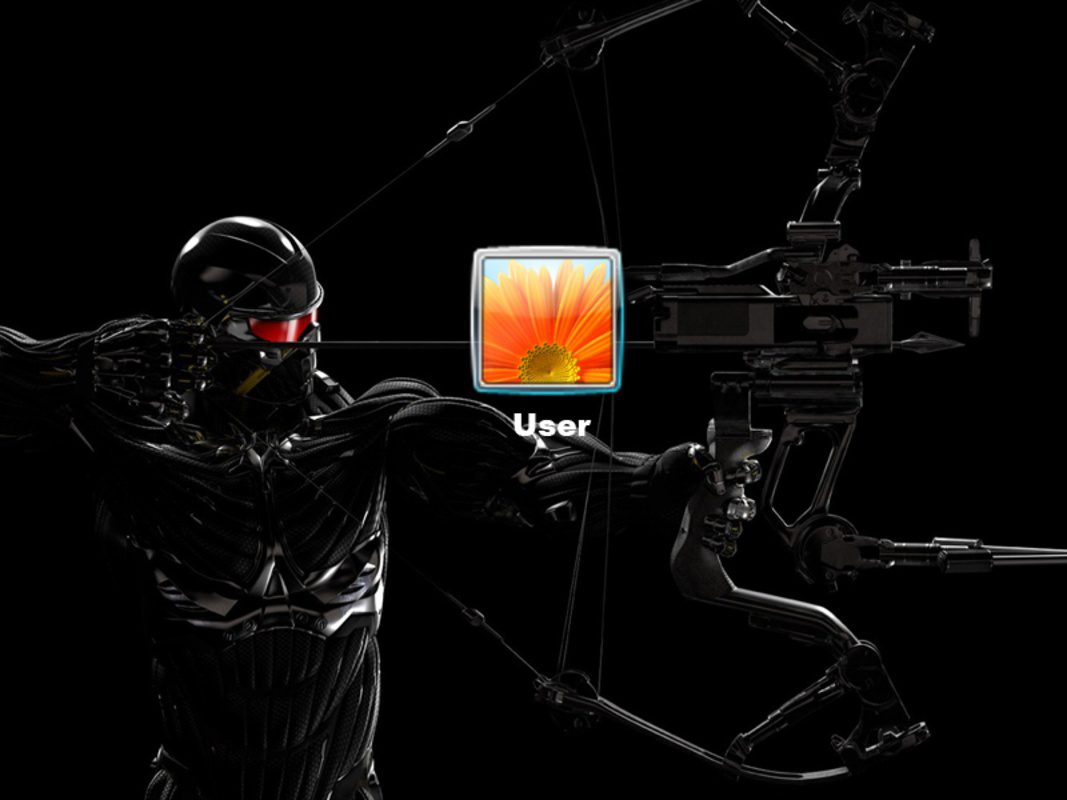
The Crysis Predator Bow Logon Screen is a niche utility designed for fans of the Crysis franchise, offering a visually immersive experience at the moment of system startup. This application transforms the standard Windows logon screen into a dynamic showcase of high-quality artwork centered around the series’ iconic protagonist and his signature weapon—the Predator Bow. By integrating these detailed visuals into the login interface, the app enhances the emotional connection between users and the game universe, providing a sense of anticipation and nostalgia each time the computer boots.
Targeted primarily at dedicated fans of the Crysis series, the app serves as a digital tribute to the game’s legacy, particularly appealing to those who value personalization and aesthetic depth in their computing environment. It functions as a form of digital expression, allowing users to carry a piece of their favorite game into their daily workflow. The app does not alter system functionality or performance but instead enriches the user’s interaction with their device through visual storytelling.
Developed by TheCrysisFan, a name suggesting a community-driven origin, the application reflects a passion project rather than a commercial product. Its release in 2013 places it within a period when fan-made utilities were increasingly popular on Windows platforms. Though not part of an official game suite, it occupies a meaningful space in the broader ecosystem of PC customization tools, bridging entertainment and personalization.
Key Features & Functionality
- High-Resolution Visuals: The app includes five meticulously crafted, high-resolution images that reflect the graphical fidelity of the Crysis series. These visuals are optimized for modern display standards, ensuring clarity and detail on a variety of screen sizes.
- Iconic Character and Weapon Focus: Each image prominently features the main character, emphasizing his advanced nanosuit and the Predator Bow. This deliberate design choice strengthens the emotional resonance for fans familiar with the game’s lore and aesthetic.
- Rotating Image Display: Users can enable automatic rotation of images between startup sessions. This feature prevents visual monotony and offers a fresh experience with every boot, enhancing long-term engagement.
- Random Image Selection: An alternative mode allows for random image display, introducing an element of surprise. This is ideal for users who enjoy unpredictability and want to maintain a sense of discovery during routine system use.
- Fan-Centric Design: Built specifically for Crysis enthusiasts, the app avoids generic templates in favor of content deeply rooted in the game’s identity. It serves as a celebration of the franchise, making it more than just a visual tool.
Real-world use cases include personal computers used for gaming, content creation, or general productivity, where users seek to express their identity through customization. For example, a gamer might use the logon screen to mentally transition into a game-ready mindset before launching titles. Similarly, a fan artist could use it as a daily reminder of their creative inspiration.
Interface, UX & Performance
The application operates through a minimalistic interface, designed to prioritize functionality over complexity. Users are presented with straightforward settings to select image rotation mode, choose between sequential or random display, and preview the current image. The navigation is intuitive, relying on standard Windows UI patterns, which ensures accessibility even for non-technical users.
Visual style aligns with the high-end aesthetic of the Crysis franchise—dark, atmospheric, and rich in detail. The layout is unobtrusive, avoiding clutter while maintaining visual impact. Although the developer did not list formal performance metrics, the app’s file size of 11.6 MB suggests lightweight operation with minimal system resource consumption.
Responsiveness is consistent with typical Windows logon screen utilities. The application integrates directly into the login process without causing delays or crashes. Stability appears reliable based on its long-standing availability since 2013. While specific device compatibility was not disclosed, the app is expected to function across standard Windows systems, including desktops and laptops.
Platform Compatibility & Technical Requirements
The Crysis Predator Bow Logon Screen is designed exclusively for the Windows platform. It is compatible with Windows operating systems, though specific version requirements were not listed by the developer. The file size of 11.6 MB indicates a lightweight installation, suitable for systems with moderate storage capacity.
Although the developer did not specify minimum OS requirements, the app’s release date in 2013 suggests compatibility with Windows 7 and later versions. It is not available on mobile platforms or macOS, limiting its reach to the Windows ecosystem. No additional software dependencies were mentioned, implying a standalone installation process.
Pros and Cons
- High-quality, fan-made visuals that celebrate the Crysis universe
- Multiple display modes (rotation and random) for varied user experience
- Lightweight design with minimal system impact
- Free to download and use
- Offers a unique way to personalize the startup experience
- Only available for Windows, not compatible with mobile or macOS
- No official updates since 2013; potential compatibility risks with newer Windows versions
- Does not include customization options beyond image selection and rotation
- Limited to five images—no user-added content support
- Developer not publicly verified; no official support channels
FAQ
Is the Crysis Predator Bow Logon Screen safe to install?
Yes, the application is free and distributed through fan communities. It does not contain malware or intrusive components. However, users should download it from trusted sources to avoid third-party modifications.
Can I use this app on Windows 10 or Windows 11?
While the developer did not specify compatibility, the app was released in 2013 and is expected to function on Windows 10 and Windows 11. Users may experience minor issues if system security policies restrict logon screen modifications.
Is the app updated regularly?
There are no known updates since its release in 2013. The app remains unchanged, relying on the original design and image set.
Can I add my own images to the logon screen?
No, the application does not support custom image uploads. It only includes the five preloaded high-resolution images from the Crysis series.
Does the app affect system performance?
No, the app is lightweight (11.6 MB) and designed to run efficiently during the logon phase. It does not consume significant CPU, memory, or disk resources.
Final Thoughts
The Crysis Predator Bow Logon Screen stands as a heartfelt homage to a beloved video game franchise, offering fans a unique way to carry the spirit of Crysis into their daily computing experience. Its combination of high-resolution visuals, rotating display options, and fan-driven design makes it a standout in the realm of niche PC utilities. While it lacks modern updates and cross-platform availability, its enduring appeal lies in its authenticity and emotional resonance.
For dedicated Crysis enthusiasts, this app delivers more than just a startup screen—it’s a daily reminder of epic gameplay, advanced technology, and immersive storytelling. It’s a tool that blends nostalgia with personalization, enhancing the connection between user and game.
Download Crysis Predator Bow Logon Screen now
Guides & Tutorials
How to install Crysis Predator Bow Logon Screen
- Click the Download button above.
- Once redirected, accept the terms and click Install.
- Wait for the Crysis Predator Bow Logon Screen download to finish on your device.
How to use Crysis Predator Bow Logon Screen
This software is primarily used for its core features described above. Open the app after installation to explore its capabilities.
User Reviews
No reviews yet. Be the first to share your experience.
You may also like
more
Que no te pillen¡
About !Que no te pillen¡Reviewed by Jason A. BilbreyShow MoreShow Less

3D Combat Zone
About 3D Combat ZoneOriginally released in 1983, 3D Combat Zone immerses players...

666: El día del portal
About 666: El día del portalOn June 6, 2006, Agent P. Stone uncovers a sinister...

80 in 1 Best Flash games
About 80 in 1 Best Flash games 80 in 1 Best Flash games is a collection of 80 fl...

ABYSS SEEKERーーWhat Do You See Deep in The Abyss
About ABYSS SEEKERーーWhat Do You See Deep in The AbyssIn ABYSS SEEKER, players...

ACA NEOGEO THE KING OF FIGHTERS 2002 for Windows
About ACA NEOGEO THE KING OF FIGHTERS 2002 for WindowsTHE KING OF FIGHTERS 2002,...